日本語 | English
Scaling & Container Layout
AccelMCP runs both single-host and multi-host deployments from the same image. By splitting the roles (WEB admin UI / MCP endpoint) into separate containers and sharing Streamable HTTP sessions through Redis, the MCP endpoint can be scaled horizontally on its own.
Container Layout
| Service | Role | Notes |
|---|---|---|
caddy |
Reverse proxy / TLS | Routes by path to web and mcp |
web |
Admin UI + REST API | Runs DB migrations on startup |
mcp |
MCP endpoint | Same image as web; does NOT run migrations |
redis |
Shared session store | Holds Streamable HTTP sessions |
db |
PostgreSQL | Application data |
web and mcp use the same image and the same app (all blueprints registered); Caddy routes
requests by path. This is what lets "all-in-one on one host" and "role-split across hosts" both run
from the same compose definition.
Caddy routing
Routing is by path, regardless of hostname.
| Path | Routed to |
|---|---|
/mcp, /mcp/<subdomain>, /<identifier>/mcp, /admin/mcp, /tools/* |
mcp |
Everything else (/, /dashboard, /api/*, /assets/*, etc.) |
web |
Caddy accepts both localhost (or ACCEL_MCP_DOMAIN) and the local-development domain
lvh.me / *.lvh.me. lvh.me always resolves to 127.0.0.1, so subdomain-based MCP
services (<identifier>.lvh.me/mcp) work out of the box with no extra configuration.
1. Single-host (local, AWS, etc.)
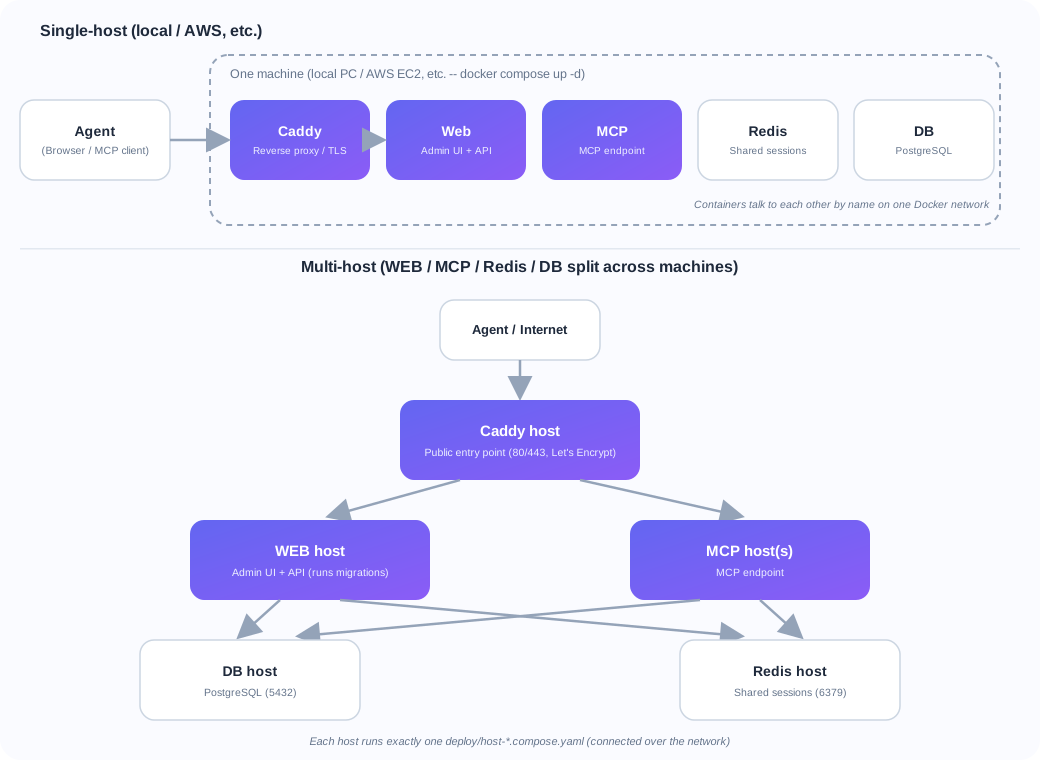
Like Dify, run all containers on one machine. The steps are the same whether it's your local PC or a cloud VM like an AWS EC2 instance — the only difference is whether you use a real domain.
Local development / testing
git clone https://github.com/t-ogawa-dev/octopus-mcp-proxy.git
cd octopus-mcp-proxy
cp .env.example .env
docker compose up -d
Access at https://localhost/ (click through the self-signed certificate warning; see
HTTPS below). No need to set ACCEL_MCP_DOMAIN.
Production on a single host (real domain, e.g. AWS EC2 or your own server)
- Provision a machine and install Docker + Docker Compose (on AWS: launch an EC2 instance and
allow ports 80 and 443 from
0.0.0.0/0in the security group, plus 22 for SSH) - Point your domain's DNS A record at that machine's public IP
- Deploy the repo and create
.env:
git clone https://github.com/t-ogawa-dev/octopus-mcp-proxy.git
cd octopus-mcp-proxy
cp .env.example .env
Edit .env:
ACCEL_MCP_DOMAIN=mcp.example.com   # your domain
FLASK_ENV=production
SECRET_KEY=<a random string, e.g. from `openssl rand -hex 32`>
ADMIN_USERNAME=<change from the default>
ADMIN_PASSWORD=<change from the default>
- Start with the production Caddyfile (Let's Encrypt):
(Or set CADDYFILE=./Caddyfile.prod in .env so plain docker compose up -d picks it up
going forward.)
-
Visit
https://mcp.example.com/loginto confirm (Let's Encrypt issues a real certificate automatically, so there's no browser warning). -
web/mcp/redis/db/caddyall run on the same machine. - Because Redis is present, Streamable HTTP sessions are stored in Redis, but a single host can also run with in-memory sessions (see below).
- To split across multiple machines instead, see 4. Spreading across multiple hosts.
HTTPS
Port 5000 on the web/mcp containers is not published to the host (expose only).
Always access through Caddy from your browser or MCP client.
| Purpose | URL |
|---|---|
| Web admin UI | https://localhost/ |
| MCP service (subdomain-based) | https://<identifier>.lvh.me/mcp |
| MCP service (path-based) | https://localhost/<identifier>/mcp |
No port number is needed (Caddy listens on 443 and proxies internally to port 5000).
"Your connection is not private" / certificate warning
This is expected. The local-dev Caddyfile uses tls internal, which issues certificates
from Caddy's own self-signed CA (Let's Encrypt cannot be used for local development,
since localhost/lvh.me are not real public domains). Two options:
A. Click through the browser warning (simplest)
Choose "Advanced" → "Proceed to localhost (unsafe)" (or equivalent) on the warning page.
B. Trust Caddy's local CA in your OS (to remove the warning)
Then import caddy_local_ca.crt into your OS trust store — on macOS, drag it into Keychain
Access and set it to "Always Trust"; on Windows, import it into "Trusted Root Certification
Authorities".
Running directly with python run.py (no Docker)
The Flask dev server binds directly to port 5000, so access it without TLS
(http://localhost:5000/, http://<identifier>.lvh.me:5000/mcp).
2. About the session store (Redis)
Streamable HTTP validates the Mcp-Session-Id issued at initialize on subsequent requests.
When the MCP endpoint runs as multiple replicas / multiple hosts, a follow-up request routed to
a different replica can no longer recognize the session, so the session must live in a shared store.
- When
REDIS_URLis set: sessions are stored in Redis (shared). - Example:
REDIS_URL=redis://redis:6379/0 - Even with multiple
mcpreplicas, any replica can validate the session. - When
REDIS_URLis unset: sessions are stored in process memory. - No extra infrastructure required. This is sufficient for single-host, single-process runs.
- Not usable with multiple replicas, since sessions are not shared between them.
compose.yaml passes REDIS_URL=redis://redis:6379/0 by default. To run a single-instance setup
without Redis, leave REDIS_URL empty.
3. Scaling only the MCP endpoint
To add replicas on the same host:
(Caddy's reverse_proxy mcp:5000 load-balances across replicas via Docker DNS round-robin. Because
sessions are shared through REDIS_URL, any replica that receives a follow-up request stays consistent.)
4. Spreading across multiple hosts
Run WEB / MCP / Redis / DB on separate machines. The deploy/ directory provides one
compose file per role, so each machine only runs the file for its role.
| File | Role | Run on |
|---|---|---|
deploy/host-db.compose.yaml |
PostgreSQL | DB host |
deploy/host-redis.compose.yaml |
Redis (shared sessions) | Redis host |
deploy/host-web.compose.yaml |
Admin UI + REST API (runs migrations) | WEB host |
deploy/host-mcp.compose.yaml |
MCP endpoint | MCP host(s) |
deploy/host-caddy.compose.yaml |
Reverse proxy / TLS (public entry point) | Caddy host |
Network requirements (firewall / security group)
| Host | Open port | Allowed from |
|---|---|---|
| DB host | 5432 | WEB host(s) and MCP host(s) only |
| Redis host | 6379 | WEB host(s) and MCP host(s) only |
| WEB host | 5000 | Caddy host only |
| MCP host | 5000 | Caddy host only |
| Caddy host | 80, 443 | The public internet (this is the entry point) |
Steps
Install Docker + Docker Compose and deploy the repo on each machine, then run the following
(from the deploy/ directory).
1. On the DB host:
2. On the Redis host:
3. Create a shared .env for the WEB host and every MCP host:
# .env (repository root)
DATABASE_URL=postgresql://mcpuser:mcppassword@<db-host-address>:5432/mcpdb
REDIS_URL=redis://<redis-host-address>:6379/0
SECRET_KEY=<a random string>
ADMIN_USERNAME=<change from the default>
ADMIN_PASSWORD=<change from the default>
FLASK_ENV=production
4. On the WEB host (this runs migrations):
5. On each MCP host (repeat on additional machines to add more MCP hosts):
6. On the Caddy host (point WEB_UPSTREAM/MCP_UPSTREAM at the other hosts):
cd deploy
ACCEL_MCP_DOMAIN=mcp.example.com \
WEB_UPSTREAM=<web-host-address>:5000 \
MCP_UPSTREAM="<mcp-host-1-address>:5000 <mcp-host-2-address>:5000" \
CADDYFILE=../Caddyfile.prod \
docker compose -f host-caddy.compose.yaml up -d
MCP_UPSTREAM accepts multiple space-separated addresses (for multiple MCP hosts). For local
multi-host testing without a real domain, use CADDYFILE=../Caddyfile (self-signed certificate)
instead.
7. Verify: visit https://mcp.example.com/login (or https://<caddy-host-address>/login)
and confirm the admin UI loads.
Key points
mcpdoes NOT run migrations (webdoes). Schema updates happen once, during the WEB host deployment.- The WEB host and every MCP host must reference the same
REDIS_URLand the sameDATABASE_URL. - To add another MCP host, just run step 5 on the new machine and add its address to the
Caddy host's
MCP_UPSTREAM, then restart Caddy. - The same steps are also documented as comments inside each
deploy/host-*.compose.yamlfile.
Related implementation
- Session store abstraction: app/services/session_store.py
InMemorySessionStore/RedisSessionStore/get_session_store(namespace)- Sessions are isolated by namespace:
"mcp"(the MCP endpoint) and"admin"(Admin MCP) - Session usage:
- app/controllers/mcp_controller.py
- app/controllers/admin_mcp_controller.py
Tests
tests/unit/infrastructure/test_session_store.py— unit tests for the session store (in-memory / Redis / backend selection)tests/unit/mcp/test_relay_and_streamable.py::TestStreamableHttpRedisSession— Streamable HTTP session round-trip on the Redis backendtests/integration/test_streamable_chain.py— multi-hop Streamable HTTP chaining with real servers